
The trigger was simple. A client noticed unusual traffic patterns and wanted to know who was visiting, from where, and whether anyone was probing for vulnerabilities. The application already had Cloudflare in front of it, so the natural goal was to close the loop: detect a bad actor in the app, block them at the edge, and get notified immediately.
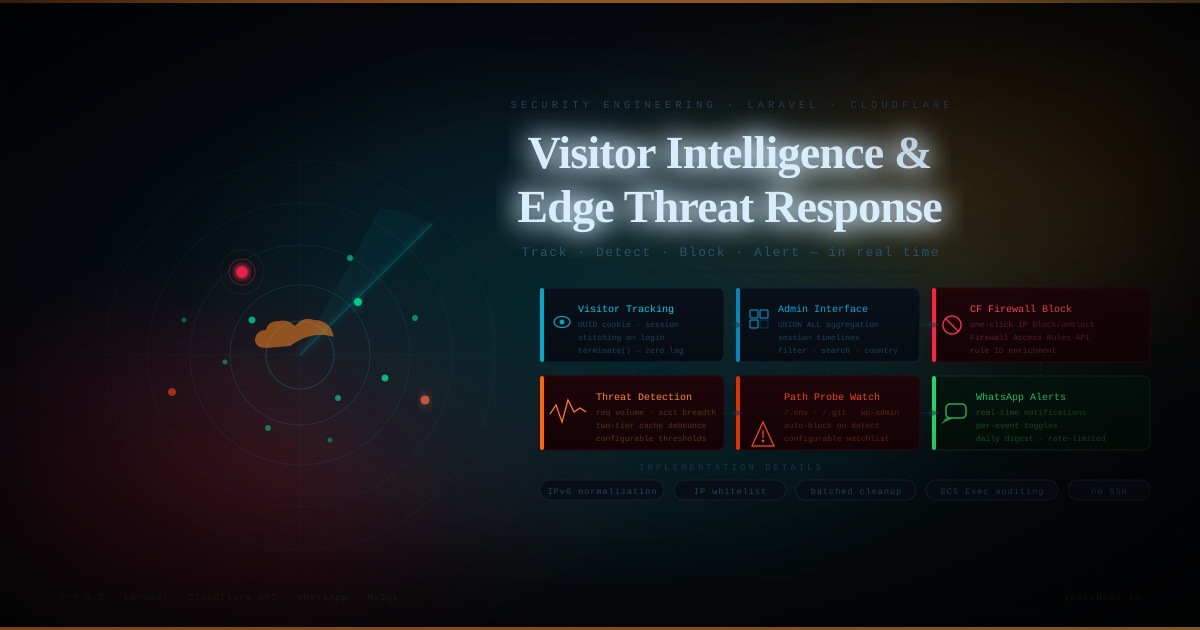
The system I built does four things: tracks all visitors (authenticated and anonymous) with full session timelines, exposes that data in an admin interface with filtering and search, integrates with the Cloudflare Firewall API to block and unblock IPs directly from the UI, and sends real-time WhatsApp alerts when something suspicious happens.
Tracking Every Visitor Without Slowing Down the App
The first decision was where to do the tracking work. Doing it synchronously in the request lifecycle adds latency on every page load. Laravel's middleware interface provides a terminate() hook that runs after the response is sent to the client, which is exactly what I needed. All database writes happen there, invisible to the user.
There was a subtle problem with this approach. I also needed to set a persistent visitor_id cookie and record the session entry URL. Both of those operations have to happen during the normal request cycle, not in terminate(). Laravel's cookie queue and session save both run before terminate() fires, so anything queued there is lost before it reaches the browser. I moved cookie generation and session entry capture into handle(), stored the visitor ID as a request attribute, and let terminate() read it from there. This distinction matters in production and it took some investigation to get right.
Each log entry captures the visitor ID (a UUID cookie that persists across sessions), the PHP session ID, IP address, country from a Cloudflare request header, the entry URL, the HTTP referrer, and the current URL. For authenticated users, the user ID is included. The middleware only logs HTML responses, which filters out asset requests, JSON endpoints, and redirects cleanly without maintaining an ever-growing exclusion list.
Guest Identity and Session Stitching
Anonymous visitors are grouped by IP address for display purposes. But a visitor who registers or logs in mid-session should have their prior anonymous activity linked to their new user account. I handled this with a stitching step in the authentication flow: on successful login or registration, the application finds all activity logs sharing the visitor's cookie ID and updates them with the resolved user ID. The visitor's history is now continuous rather than split between a guest record and an authenticated record.
One thing worth noting: the application's primary authentication was handled by a custom controller rather than the standard Laravel auth hooks. That meant the obvious places to add stitching logic (LoginController::authenticated() and RegisterController::registered()) were bypassed entirely in normal flow. Finding that required tracing the actual POST routes, not assuming the framework defaults were in use.
The Admin Interface
The visitor activity view aggregates registered users by user ID and anonymous guests by IP address using a UNION ALL query. This gives one row per person rather than one row per session, which is what you actually want when reviewing who visited. Each row links to a session timeline showing every page viewed, in order, with timestamps, entry URL, and referrer.
The IP management view aggregates all recorded IPs with request counts, session counts, linked account counts, and first/last seen times. It queries the Cloudflare API on load to check which IPs are currently blocked, then merges that status into the paginated results on the PHP side. IPv6 addresses required normalization using inet_pton and inet_ntop because the format returned by Cloudflare (fully expanded) often differed from what was stored in the database (abbreviated), which caused block status checks to fail silently until I identified the mismatch.
Both views support timeframe filtering (today, yesterday, this week, this month, or a custom datetime range), search by IP or name, and country filtering. All filter logic lives in the controllers. The views receive pre-computed values and do no querying of their own.
Cloudflare Integration
Blocking an IP is a POST to the Cloudflare Firewall Access Rules API. Unblocking requires finding the rule by its ID and deleting it. The tricky part was that when an admin unblocks an IP, the system needs the rule ID, not just the IP address. I enriched each paginated row with the rule ID during data preparation so the unblock form could submit it directly, avoiding a secondary API lookup on every unblock action.
All external HTTP calls to Cloudflare have an explicit timeout. Without it, a slow or unresponsive API call blocks the admin page load with no feedback and no failure path. A ten-second timeout gives enough room for legitimate latency while ensuring the application degrades gracefully if the API is unavailable.
Suspicious Activity Detection
Two behavioral patterns trigger alerts. The first is request volume: if an IP makes more than a configurable number of requests within a rolling hour, it is flagged. The second is account breadth: if the same IP is linked to more than a configurable number of distinct user accounts, it may indicate credential stuffing or shared-device abuse. Both thresholds are adjustable from the admin settings page.
To avoid hitting the database on every single request, I used a two-tier cache check. If an IP has already triggered an alert within the past hour, a cache key blocks any further processing. If it has been checked recently and found clean, a shorter-lived cache key skips the database query entirely. Only genuinely unknown IPs trigger the count query.
Similarly, updates to the users table (last IP, last seen, last URL) are debounced with a one-minute cache key per user. An active user browsing multiple pages would otherwise generate a write on every page view, which adds up quickly on a busy site.
Malicious Path Detection
A separate detection layer watches for probes targeting known attack paths: environment files, Git configuration, WordPress admin endpoints, PHP info pages, shell upload scripts, and similar. When a request matches the watch list, an alert fires immediately. The system also supports optionally auto-blocking the IP on Cloudflare the moment a probe is detected, without requiring any admin interaction.
This check runs outside the normal activity logging gate. The logging code only processes HTML responses by design, but a probe to /.env might return a redirect or a non-HTML error page. Running the path check before the content-type filter ensures no probe slips through undetected. The watch list is configurable so additional paths can be added from the admin panel without a deployment.
Alerts are rate-limited to at most one per IP per hour using a cache key, so a scanner hammering the same path does not flood the notification channel.
WhatsApp Alerts
The application already had a WhatsApp messaging driver integrated for other features. I built an alert service on top of it that centralizes all security and activity notifications. Each alert type (suspicious IP, malicious probe, IP blocked, new user registration, admin login, daily digest) has its own toggle in the admin settings so the operator can subscribe to exactly what they want. Each also checks a global enabled flag and a configured phone number before attempting to send, so misconfiguration fails silently rather than throwing errors into the application log.
IP Whitelisting
Not every high-traffic IP is a threat. A monitoring service, a load balancer, or a developer's workstation can all look suspicious based on raw numbers. I added a dismiss action to the IP management UI that adds an IP to a whitelist stored in application settings. Whitelisted IPs no longer show the suspicious flag, no longer trigger alerts, and can be restored to normal monitoring at any time. The whitelist is checked in both the controller (for the UI flag) and the middleware (to suppress alerts at the source).
Deployment Considerations
The feature ships as four additive database migrations: one new table, nullable columns added to an existing table, and two migrations seeding default settings. None of them modify or remove existing data, which made the production deployment straightforward. The CI/CD pipeline handles staging migrations automatically and exposes a manual migration trigger for production with an automatic database backup taken before any migration runs.
A scheduled cleanup command removes log entries older than a configurable number of days. Deletes run in batches to avoid locking the table on large datasets. A daily digest command summarizes visitor counts, page views, new registrations, and flagged IPs and sends the summary as a WhatsApp message each morning.
What I Would Approach Differently
The suspicious IP check still runs synchronously in terminate(). For very high-traffic applications, offloading it to a queued job would be cleaner. The current caching strategy handles it well in practice, but the architectural coupling between request processing and threat detection is worth revisiting as traffic grows.
I would also consider a dedicated lightweight table for the malicious path events rather than relying on cache keys alone to track alert state. This would give admins a searchable history of probe attempts, not just real-time notifications.
Outcome
The system is running in production across staging and production environments. Admins have real-time visibility into visitor behavior, can act on threats immediately without SSH access or a separate security tool, and receive alerts for the specific events they care about. The implementation added no measurable latency to page loads and introduced no new external dependencies beyond the Cloudflare API, which was already in use at the infrastructure level.